Peace is a Windows graphical interface (GUI) for Equalizer APO that makes it easy to control your sound with sliders, curves, and presets.
It offers real-time adjustments while listening without needing to edit text files, making it ideal for gamers, podcasters, or music lovers to improve or customize audio on Windows PCs.
In short, the Peace Equalizer is an audio mixer that works perfectly for any version of Windows, from Vista to 11.
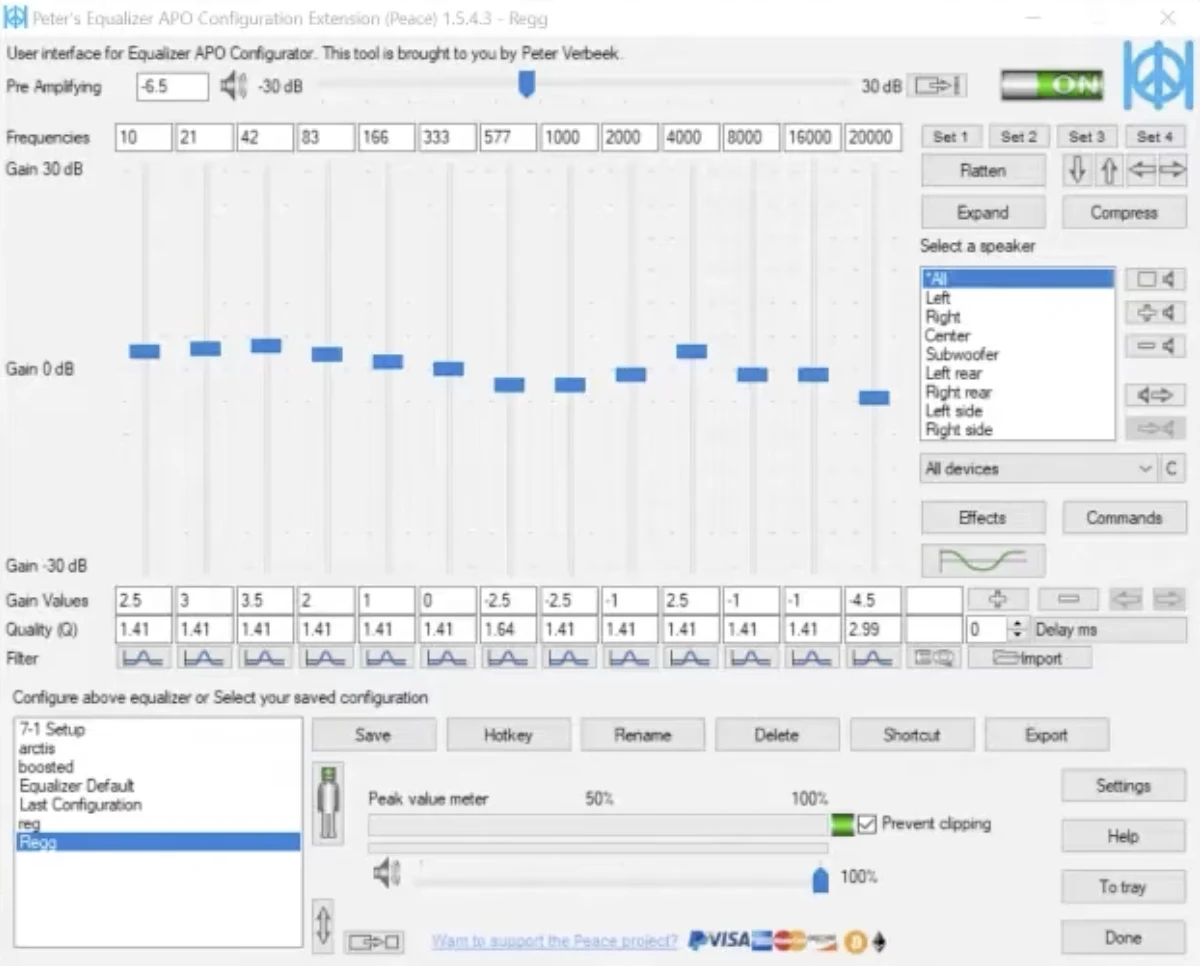
Peace Equalizer APO is a comprehensive Graphical User Interface for Equalizer APO in Windows. It is a system-wide EQ that adjusts your audio and controls things such as balance, delay, and crossfeed.
With Peace EQ, Equalizer APO becomes an intuitive, feature-rich audio control center, making it easy to customize your sound exactly as you require without touching a single configuration file.

The Peace interface is divided into 3 main parts, each designed to make audio control simple and organized:
Manages and loads Peace Equalizer presets and filter settings. Switch between gaming, movie, voice, or music profiles with a single click or keyboard hotkey.
Adjusts frequencies precisely using up to 31 slider bands or manual numeric values. Control center frequency, dB gain, and Q values with real-time audio feedback.
Choose speakers or channels you want to configure. A specialized feature is for the hearing impaired — left and right-channel amplification and EQ can be adjusted independently.
Explore the key features that make Peace the most popular graphical interface for Equalizer APO:
Automatically adjusts sounds for 1000+ headphone models using precise, scientifically measured frequency correction profiles.
Provides a live frequency response curve for each speaker and channel, showing exactly how your adjustments affect the audio signal.
With Peace EQ, you can choose from a range of colors, layouts, and compact view modes to customize the theme tailored to your choice.
Easily switch between profiles using hotkeys and save unlimited custom Peace Equalizer presets for different headphones and audio apps.
Adjust up to 31 gain dB Equalizer sliders per channel. All sliders have their own frequencies, gain, and Q values, expandable via the + or - buttons.
Using customizable keyboard shortcuts, you can control Peace from anywhere on your PC, toggle EQ on/off, or switch profiles in-game.
Set up stereo, 5.1, 7.1, or custom speaker settings for up to 9 channels with individual channel gain and delay controls.
Easily apply balance, crossfeed, bass boost, stereo widening, and virtual surround effects directly from the graphical panel.
Multiple languages are available for users worldwide, making audio tuning straightforward regardless of your regional preferences.
Peace offers multiple convenient ways to manage your audio settings seamlessly across Windows:
Launch specific EQ profiles with one click from your desktop.
Load profiles automatically for designated audio devices or apps.
Switch presets and adjust audio quickly without leaving games.
Start Peace automatically when Windows boots in tray mode.
Open Peace instantly from the Windows taskbar tray menu.
Peace includes a wide range of professional filter types to sculpt your sound precisely:
Adjust frequency points with pinpoint center frequency and Q factor control.
Smoothly boost or reduce entire bass or treble frequency ranges.
Cut out unwanted low-end rumble or harsh high frequencies beyond cutoffs.
Fine-tune specific audio bands and adjust phase response with advanced control.
Remove unwanted narrow sound spikes, background hums, or microphone noise.
Download the latest official installer for Peace Equalizer below. Ensure you have Equalizer APO installed on your Windows PC for Peace to function properly.
Follow these step-by-step instructions to get Peace EQ working on your system:
Installing Equalizer APO is the foremost requirement for Peace EQ. Install Equalizer APO version 0.9.1 or above on your Windows PC and select your output device during setup.
Once Equalizer APO is installed on your device, download the latest version of Peace Equalizer (PeaceSetup.exe) from our verified download link above.
Run the installer named PeaceSetup.exe. It will automatically detect your Equalizer APO installation and configure the Peace settings accordingly.
Some antivirus programs may falsely show PeaceSetup.exe as a threat due to how it modifies Windows audio settings. Ignore this false warning; Peace is safe and open source.
Open Peace Equalizer from the Windows Start menu. You’ll be able to see the default, customizable interface settings with either the Simple or Full interface view.
Select a preset for your headphones from the AutoEQ database, choose a built-in profile, or create a custom EQ profile using the 31-band Equalizer sliders.
Peace EQ is completely safe to use and doesn't contain viruses or spyware, provided it is downloaded from a trusted online source. Here's how you can ensure the safety of Peace:
Note: The original developer of Peace (Peter Verbeek) has warned users about unauthorized scam sites using the Peace Equalizer name. Always ensure you download legitimate, unmodified installers.